Broadcast2Post | Podcast by Key Code Media
The latest episode of the Broadcast2Post Podcast explored the essentials of building a podcast studio from three unique perspectives. Michael Kammes broke down the key considerations every podcaster should address before buying gear—from room acoustics and mic choice to future growth planning. Matthew Hilton and Austin Anderson from Kentucky Farm Bureau Studios shared how their “Let’s Get Rural” podcast grew from a new studio build-out, balancing technical learning curves with a mission-driven focus on community storytelling. Finally, Dolby’s Tom McAndrew and CJ Drumeller highlighted the rise of immersive podcasting with Dolby Atmos, showing how 3D audio can boost listener engagement and prepare creators for the future of podcasting.
Also, don’t miss the Key Code Media Podcast Studio Design: Key Considerations Before You Build outlined below.
Podcast Studio Design: Key Considerations Before You Build
Podcast Studio Design Checklist: Questions to Ask Before You Build
Launching a podcast can be as simple as recording on your laptop but if you want professional sound, video, and a workflow that scales with your show, a dedicated studio makes all the difference.
Why does this matter? Podcasting is no longer just a niche medium. In 2024, more than 40% of Americans listened to a podcast monthly, and podcast ad revenue surpassed $2 billion annually. Brands, universities, and enterprises alike are building podcast studios not only to reach new audiences, but also to:
- Communicate internally with employees through private podcast feeds.
- Grow brand authority by positioning executives and subject matter experts as thought leaders.
- Unlock new revenue streams through sponsorships, advertising, and syndication.
If your team is planning a studio build, it’s worth asking the right questions before buying microphones or cameras. At Key Code Media, we guide clients through these considerations to design studios that balance budget, scalability, and professional results.
1) How many people will be on mic at once?
The number of participants directly shapes your gear list and layout. More people means more microphones, headphones, seating, camera angles, and a larger audio interface or mixer. Planning ahead for whether the studio will host just one executive or multiple roundtable guests will determine the infrastructure you need. If high-profile visitors are part of your plan, pre-wired mic positions and seating layouts create a seamless guest experience. On the video side, multiple speakers often require additional cameras to avoid awkward framing or static, one-angle recordings.
Questions to ask:
- Do you expect mostly solo recordings, or regular co-hosts?
- Will you bring in guests in-person, and if yes, how many seats should be wired and mic’d?
2) What kind of room are you working with?
Room acoustics are just as important as your equipment. A poorly treated space will lead to echo, reverb, and background noise that distracts listeners. Choosing the right room means considering noise sources like HVAC systems, street traffic, or nearby offices, and addressing them before recording begins. Acoustic treatments such as wall panels, ceiling clouds, and carpets can transform an echoey office into a professional studio. Privacy is also a factor, particularly for organizations that plan to record sensitive conversations or executive communications, where sound isolation becomes essential.
Questions to ask:
- Is this a dedicated space or a multi-purpose room?
- How quiet is the environment — HVAC noise, street sounds, or neighboring offices?
- Will you need acoustic treatment or sound isolation for live recording near other work areas?
3) What microphone types make sense?
Microphones define the sound quality and tone of your podcast. Condenser microphones capture a highly detailed sound but are less forgiving in untreated rooms, while dynamic microphones are sturdier and more resistant to background noise. Beyond the microphone itself, planning for the “sound identity” of your show is important — do you want a warm, broadcast-style tone or a clear, studio-like sound? Many teams also invest in multi-channel setups to allow for more flexibility during editing. Accessories such as pop filters, boom arms, and shock mounts, though often overlooked, play a big role in comfort and consistency during recording sessions.
Questions to ask:
- Do you prefer the “radio broadcaster” sound or studio-like clarity?
- Do you want individual mic channels for each person?
- Will you need accessories like boom arms or pop filters?
4) Will guests join in-person, remote, or both?
Your connectivity setup depends heavily on how your podcast guests will participate. Hybrid formats — with some guests in-person and others remote — are now common, and they require a well-thought-out technical workflow. Remote guests joining via platforms like Zoom, Teams, or Riverside often need dedicated audio routing and echo cancellation to avoid feedback. A proper mix-minus setup ensures remote participants don’t hear themselves on delay. From the audience’s perspective, you’ll also need to decide whether remote guests should appear on video alongside in-studio hosts, which changes the requirements for camera switching and display systems.
Questions to ask:
- How often will guests connect remotely?
- Do you need a dedicated computer and capture hardware for calls?
- Should remote participants be visible in recordings or streams?
5) Do you need a control room or “producer station”?
A control room or producer station plays a significant role in keeping recordings clean and polished. If you plan to have a producer, a dedicated control space makes it easier to adjust audio levels, add live graphics, or switch cameras without interrupting the flow of the conversation. For larger organizations, a control room also ensures consistency if multiple people use the studio across different shows. Some teams, however, prefer a simplified workflow that enables a host to run the show solo with minimal technical expertise. Planning early for whether your setup needs to accommodate a producer or be user-friendly for non-technical staff will help guide equipment decisions.
Questions to ask:
- Will you self-produce or hire a producer?
- Do you need a separate control room with a window into the studio?
- Should the system be simple enough for non-technical users to run?
6) Will you add video to your podcast?
Video podcasting expands reach dramatically, especially on platforms like YouTube, LinkedIn, and TikTok, but it requires careful planning. A single camera may be enough for a casual setup, but a multi-camera system allows for more dynamic editing and live production. Lighting also plays a critical role in how professional your podcast looks, and investment in proper LED or softbox lighting can instantly elevate production value. Branding elements such as intros, overlays, and lower thirds help reinforce your organization’s identity and make the show feel more polished.
Questions to ask:
- Do you want a static camera, or multi-cam setup?
- Will you integrate graphics and branded overlays?
- Do you need remote participants visible on screen?
7) Do you want to share presentations, videos, or screen demos?
Many podcasts now go beyond simple conversations and integrate slides, product demonstrations, or gameplay. Incorporating this type of content requires planning for video switchers, capture cards, and confidence monitors to ensure smooth transitions between sources. From an audience perspective, layouts like picture-in-picture are key for keeping both the presenter and the content visible at the same time. Teams also need to consider whether these elements will be live-streamed in real time or added later in post-production, as that impacts the technical setup.
Questions to ask:
- Will you capture laptop outputs (PowerPoint, product demos)?
- Do you need picture-in-picture layouts?
- Should your system allow live streaming as well as recording?
8) What’s your growth plan?
Studios that plan for expansion from the start often save money long-term. Even if you begin with a small audio-only setup, leaving room for more microphone inputs, camera upgrades, or added outputs will make it easier to scale later. Growth planning also includes thinking about production frequency: a studio producing multiple shows each week may eventually need automation or a larger production staff. Many organizations also evolve into hosting live webinars, hybrid events, or multi-camera productions, so having infrastructure that can adapt ensures your investment doesn’t become obsolete too quickly.
Questions to ask:
- Do you want flexibility to grow from audio-only to video?
- How many shows per week are you planning now vs. in a year?
- Will you need integration with remote contributors or live events?
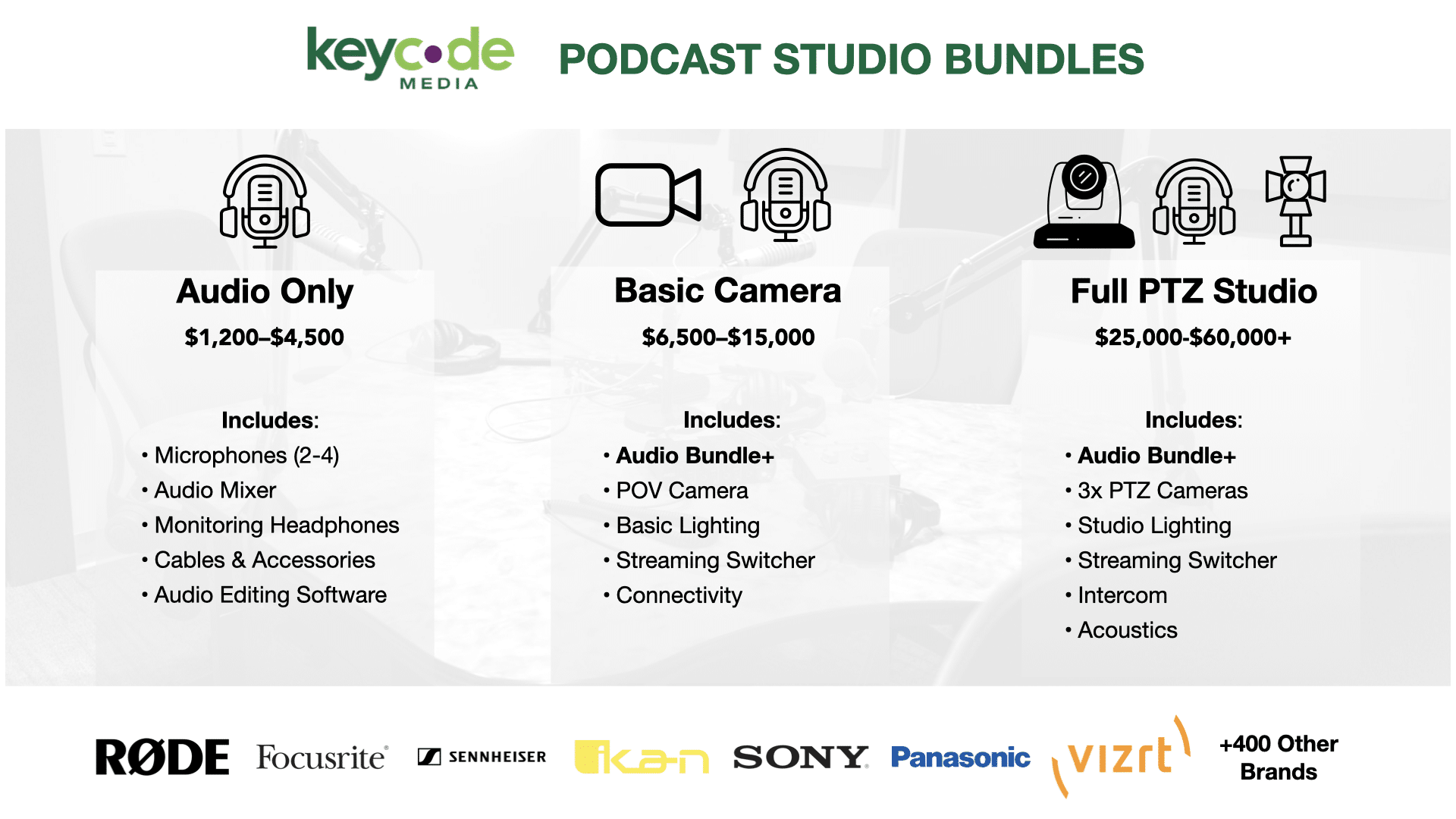
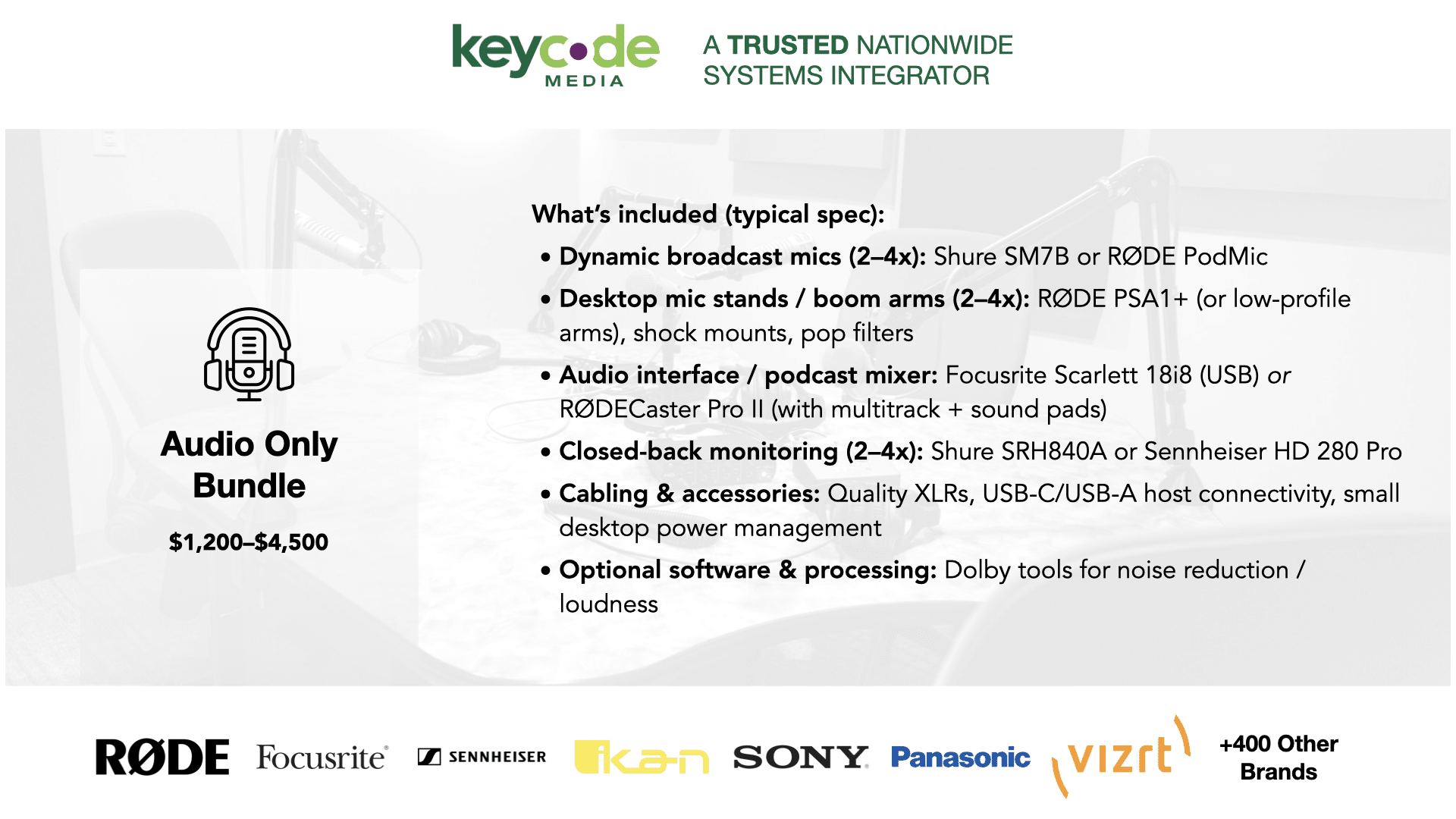
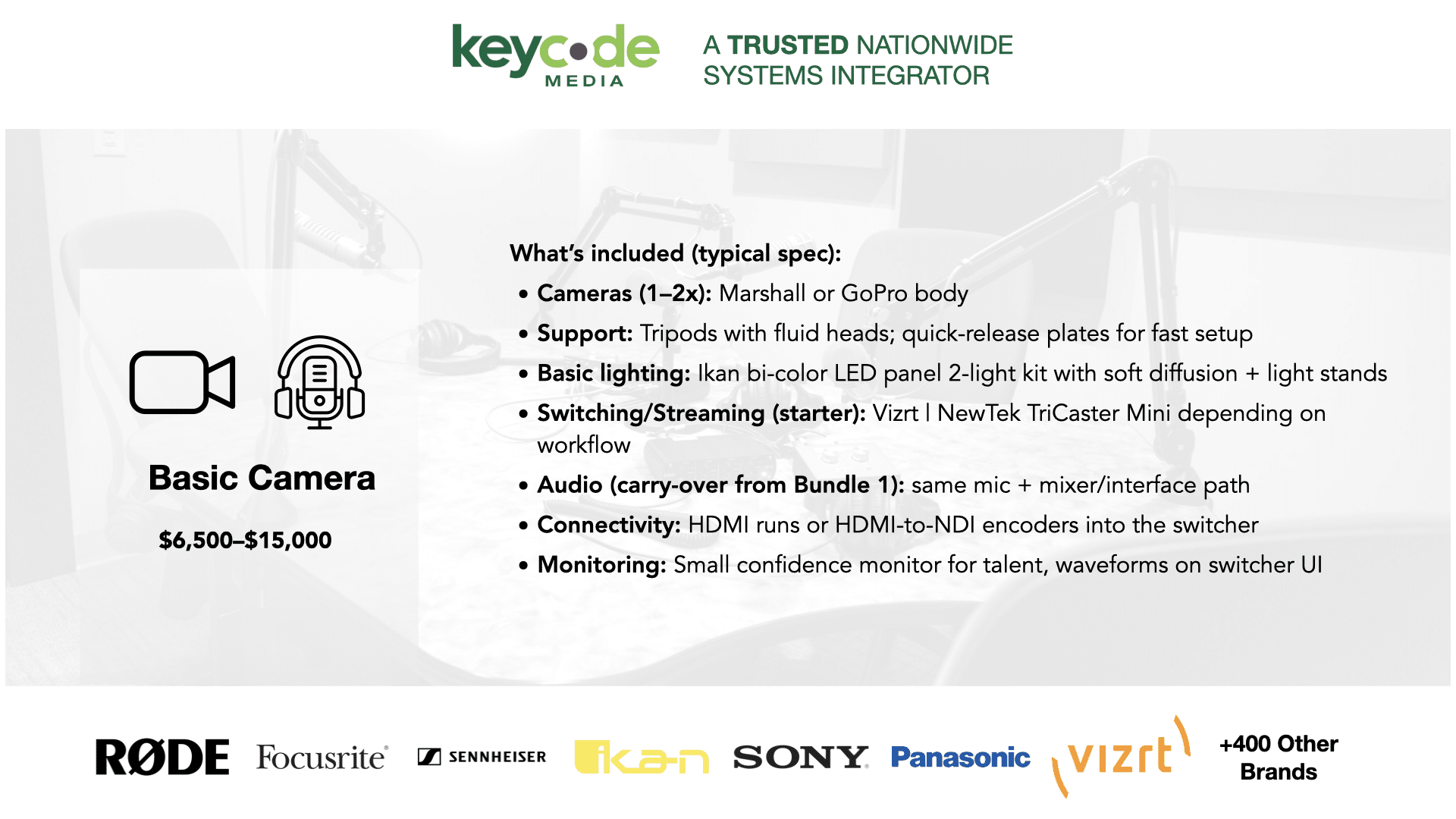
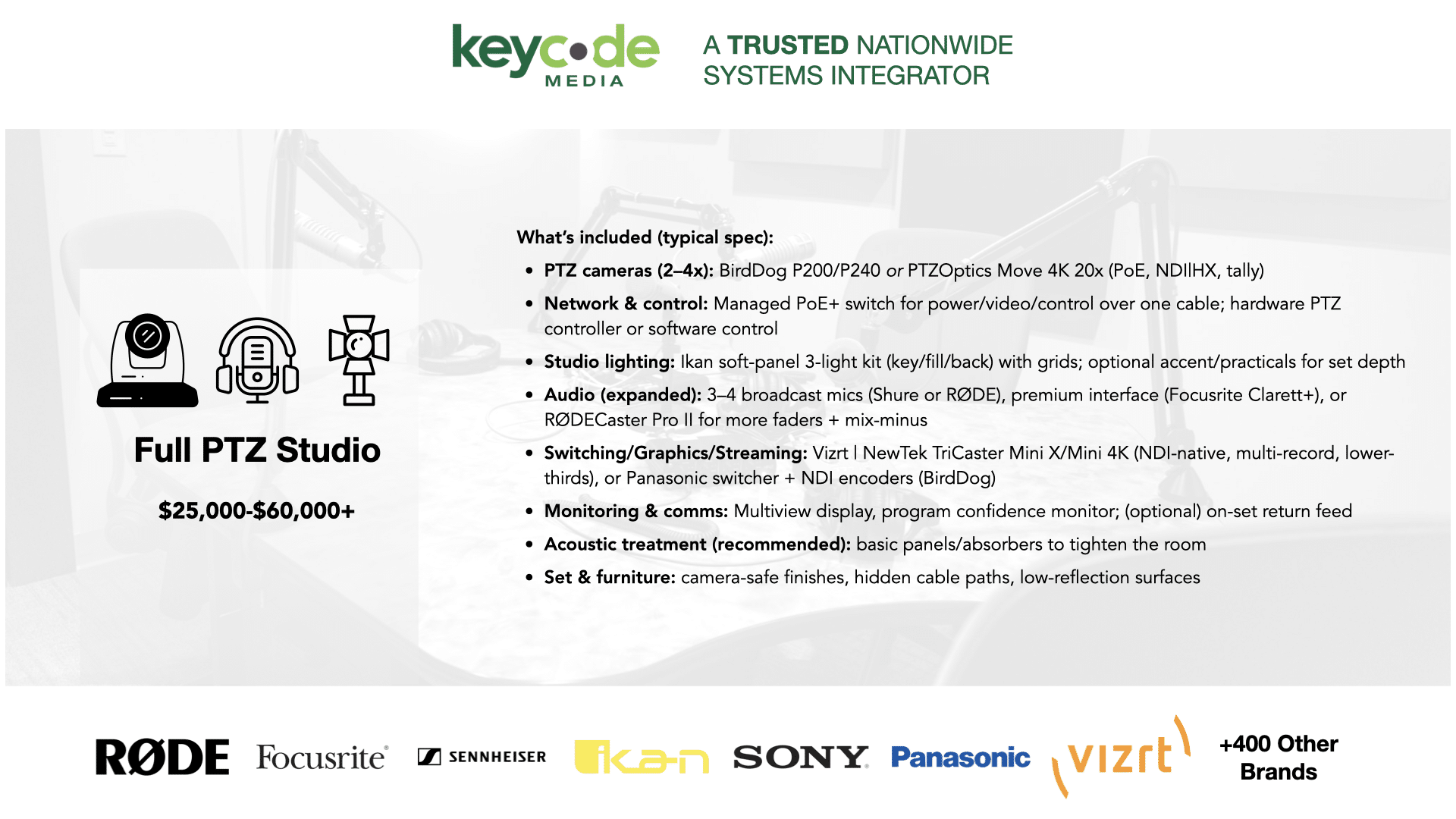
Podcast Starter Bundles
To make the next steps in your Podcast Studio journey easier, Key Code Media has created our Podcast Starter bundles.
Contact Key Code Media today to learn more about our Podcast Starter Bundles and start building your perfect studio. Our engineers will map out the products you need, tailored to your budget requirements, and guide you through the best path forward.
BROADCAST2POST SPONSORS
Big thanks to our annual partner sponsors for the podcast!

Subscribe to the Podcast