
What Do Creative Teams Actually Want From AI?
When most people think about artificial intelligence in video production, they think about generative AI: creating images, producing video clips, writing scripts, or automatically editing content. These tools are advancing quickly, but many production facilities face a more immediate challenge. They already have enormous libraries of valuable media, and finding the right footage can be frustratingly time-consuming.
Consider a documentary production company managing decades of archival interviews, a broadcaster searching through years of news coverage, or a corporate video department maintaining thousands of product demonstrations. Even with an established media asset management (MAM) system, locating a specific moment often depends on whether somebody properly tagged the content when it was originally ingested.
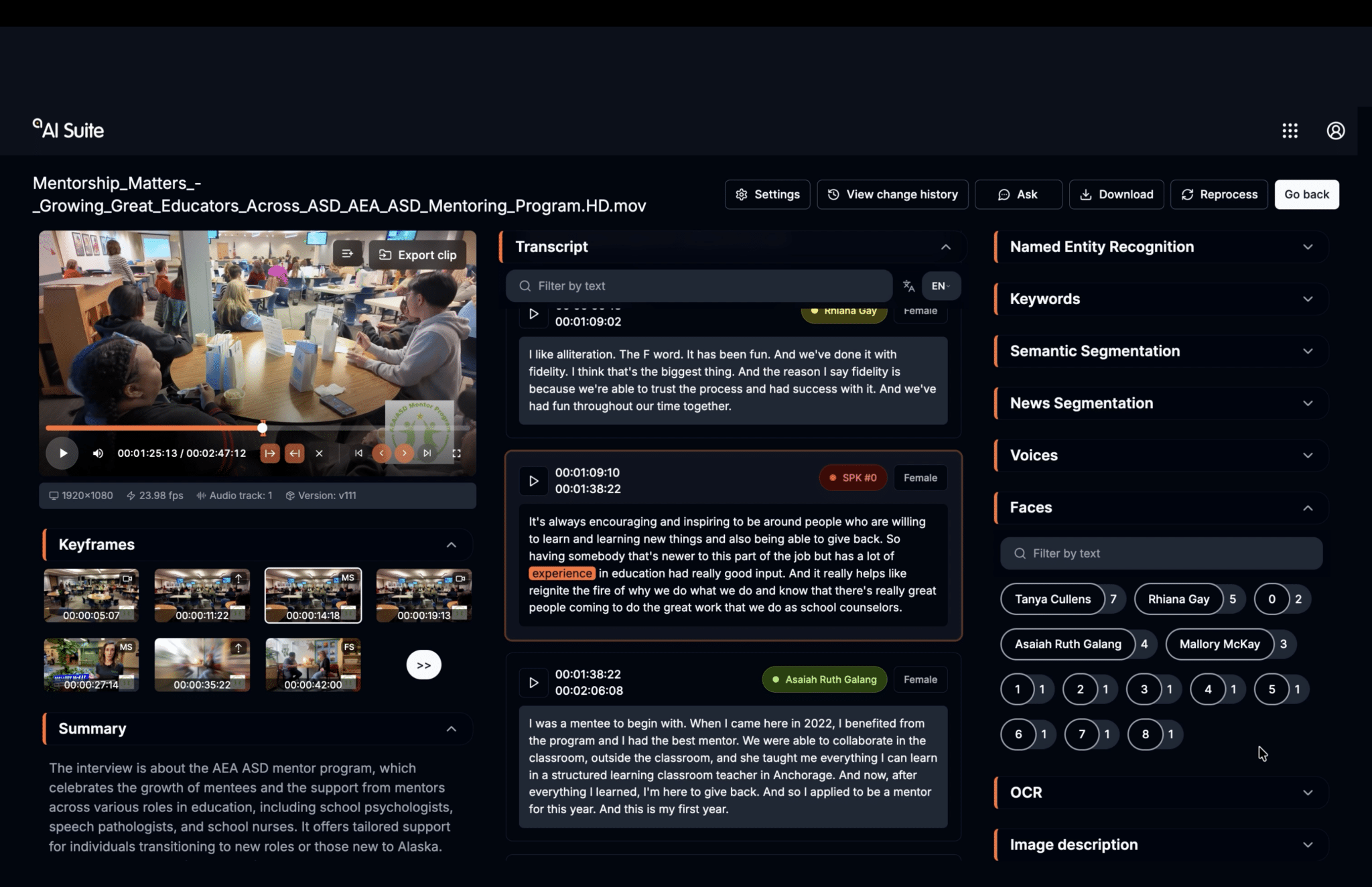
Analytical AI changes that workflow by examining the media itself. Instead of relying exclusively on manually entered keywords, AI can analyze spoken dialogue, recognize people and objects, identify scenes, and generate searchable metadata.
Some of the most practical AI applications for creative teams include:
- Transcription and Translation: Convert spoken dialogue into timecoded text and translate content for international audiences.
- Natural-Language Media Search: Find footage using everyday language rather than relying on exact filenames or metadata.
- Facial and Voice Recognition: Identify individuals appearing or speaking across extensive video libraries.
- Scene and Object Recognition: Locate environments, activities, logos, and visual characteristics within recorded media.
- Semantic Segmentation: Identify changes in conversation topics and divide lengthy recordings into searchable sections.
- Automated Metadata Generation: Create descriptive information without requiring someone to manually review every frame.
These technologies aren’t replacing traditional media asset management systems. Instead, they’re enhancing them by making content searchable in ways that weren’t previously possible without extensive manual logging.
For technical decision-makers, the next question is where these AI models should run, how they integrate with existing infrastructure, and what they’ll actually cost to operate.
Cloud vs. On-Prem AI: What’s the Difference?
The fundamental difference between cloud-based and On-Prem AI is where processing occurs and who manages the infrastructure. Both approaches can support transcription, translation, media analysis, and intelligent search, but they create different considerations around cost, performance, security, and scalability.
Cloud-based AI relies on computing resources hosted by external providers. Organizations can access powerful AI models without purchasing dedicated GPU infrastructure, making it attractive for teams experimenting with AI or managing workloads that fluctuate throughout the year. However, depending on the platform, media may need to be uploaded or transferred to external services, and processing charges can vary significantly based on usage.
On-Prem AI runs models on computing infrastructure managed within the organization’s own environment, typically using GPU-equipped servers. This allows media to be processed locally, often alongside existing shared storage and media asset management systems. While it requires an upfront hardware investment and ongoing maintenance, it offers greater control over data, processing resources, and potentially more predictable operating costs.
Cloud AI vs. On-Prem AI Comparison
Consideration | Cloud-Based AI | On-Prem AI |
Upfront Investment | Typically lower | Requires local hardware |
Processing Costs | Subscription or usage-based | Hardware, software, power, and maintenance |
Scalability | Expand resources on demand | Limited by installed capacity |
Data Security | Depends on provider and agreements | Greater direct control over local processing |
Large Media Libraries | May require substantial data transfers | Can process media near existing storage |
Model Updates | Generally managed by provider | Depends on software and hardware support |
Best Fit | Variable workloads and specialized models | High-volume processing and sensitive content |
Neither architecture is inherently better. Much like modern media storage environments, many facilities may ultimately adopt a hybrid approach, keeping sensitive or high-volume AI processing On-Prem while using approved cloud services for specialized applications.
Understanding the Real Costs of AI Video Processing
One of the biggest challenges with cloud AI is understanding how usage translates into actual operating expenses. Unlike a typical chatbot interaction, analyzing video often requires multiple AI models processing the same footage for different purposes.
A production team might use one model for transcription, another for facial recognition, and additional models for scene detection, object recognition, translation, or summarization. Depending on the service, each function may involve separate processing operations and associated charges.
Why One Hour of Video Doesn’t Always Mean One Hour of Processing
Consider a live production recording an eight-hour event using ten cameras. While the event itself lasts eight hours, the production generates 80 camera-hours of footage.
If the organization wants to analyze every camera recording, that’s 80 hours of source material before accounting for additional AI operations.
Now apply that same logic to a broadcaster managing hundreds of thousands of hours of archival footage. Running transcription, facial recognition, scene detection, and other analytical models across the library can create an enormous processing workload.
Cloud AI providers may charge by tokens, processed media minutes, API transactions, or computing resources, making it important to understand how each service calculates usage.
Another consideration is reprocessing existing media. As AI models improve, organizations may want to revisit previously analyzed content to generate better metadata, identify additional people, or take advantage of new capabilities. Depending on the platform, reprocessing that content can introduce additional charges.
Comparing Total Cost of Ownership
When evaluating cloud versus On-Prem AI, technical decision-makers should consider the full cost of operating the system over several years.
Cloud AI expenses may include:
- Subscription, token, or per-minute processing fees
- Cloud storage and data transfer
- Multiple AI analysis operations
- Reprocessing existing media libraries
- Enterprise licensing and usage limitations
On-Prem AI expenses may include:
- GPU servers and supporting infrastructure
- Software licensing and support
- Electricity, cooling, and maintenance
- IT administration and future hardware upgrades
Cloud AI can be economical for occasional or unpredictable workloads because organizations avoid purchasing infrastructure that might otherwise sit idle. On-Prem AI becomes increasingly attractive when processing is continuous, media libraries are extensive, or predictable expenses are a priority.
The most useful comparison isn’t the monthly subscription price versus the cost of a server. It’s the total cost per processed media hour over the expected life of the system, accounting for all required AI operations.
Security, Intellectual Property, and AI Data Governance
Security is an important consideration for any organization adopting AI, but media and entertainment companies face a unique challenge. In many production environments, the video files themselves represent the organization’s most valuable intellectual property.
Post-production facilities regularly handle unreleased films, television programs, advertising campaigns, and confidential client footage. Sending that material to an external AI processing service may introduce contractual and security concerns, particularly when studios or content owners restrict third-party access.
Some production agreements prohibit cloud processing entirely, while others permit only specifically approved services. Before adopting any cloud AI platform, organizations need to understand where their media is processed, whether content is retained or used for model training, and how the provider protects sensitive information.
On-Prem AI offers an alternative when media must remain within a controlled environment. Running models locally allows organizations to process content without transmitting source footage to an external AI provider, while continuing to use established network security and access-control policies.
Enterprise cloud platforms can also offer strong security protections, private processing options, and contractual safeguards. The right approach ultimately depends on the organization’s client requirements, internal policies, and tolerance for external data processing.
SNS AI Suite: Bringing On-Prem AI Into Media Workflows
Studio Network Solutions (SNS) brings analytical AI directly into professional media workflows through its On-Prem SNS AI Suite. Building on its EVO shared storage, ShareBrowser asset management, and Slingshot automation platforms, SNS helps creative teams analyze, organize, and search their existing content without relying on cloud-based processing.
The AI Suite combines transcription, translation, facial and voice recognition, scene detection, semantic segmentation, and automated metadata generation. Editors can quickly locate specific dialogue, identify people across years of footage, or find scenes and objects without manually tagging every asset.
In September 2026, SNS introduced AI Suite Advanced, adding natural-language search and agentic AI capabilities. Users can search footage conversationally and perform more complex tasks, such as generating an edit decision list (EDL) based on specific content criteria.
Unlike consumption-based cloud AI services, SNS runs locally on customer-controlled hardware and offers perpetual software licensing with unlimited AI processing hours rather than token-based or per-minute charges. While hardware, maintenance, and electricity remain considerations, this approach can provide more predictable costs for facilities processing large media libraries.
For organizations already using shared storage and MAM systems, SNS demonstrates how AI can become a natural extension of existing production workflows, making media faster to find, understand, and reuse.
Best Practices for Implementing AI in Media Production
Introducing AI into a production environment requires more than purchasing software or installing a GPU server. Organizations should evaluate how AI will interact with their existing workflows, what information it needs to analyze, and how the results will be used by creative teams.
One important consideration is that AI workflows can begin during production, not just in post-production.
For example, when shooting a location, capturing a building’s nameplate or address can provide useful information for AI systems equipped with optical character recognition (OCR). Camera operators conducting location scouts can verbally identify where they’re filming, allowing transcription tools to associate spoken context with the footage.
Even traditional production tools like clapperboards become increasingly useful when AI can recognize written text and associate it with recorded media. Similarly, identifying preferred takes verbally can help assistant editors locate important moments later in the workflow.
These small changes can improve the quality of AI-generated metadata without substantially changing how production teams work.
Five Questions to Ask Before Choosing an AI Platform
Before committing to cloud or On-Prem infrastructure, consider these questions:
- What problems are we trying to solve? Identify specific workflows where AI can reduce manual work, such as transcription, logging, translation, or media search.
- How much content will we process? Estimate monthly footage volumes, required AI operations, and whether archived media will need to be reprocessed.
- Where does our media live today? Consider how AI will integrate with existing shared storage, networking, editing systems, and asset management platforms.
- What are our security requirements? Review client contracts, intellectual property protections, and approved cloud-processing policies.
- What will the system cost over time? Compare hardware and operating expenses against subscriptions, consumption fees, and projected usage growth.
AI-generated information should also remain reviewable by production teams. Transcripts, translations, facial recognition, and automated descriptions can make mistakes, so important metadata and editorial decisions still require human oversight.
Ultimately, the goal isn’t to deploy the most powerful AI model available. It’s to implement tools that solve real production problems, integrate with existing infrastructure, and allow creative professionals to spend more time creating and less time managing media.
Explore AI Solutions with Key Code Media
Key Code Media helps broadcast, post-production, and enterprise creative teams design, integrate, and support professional media workflows, including shared storage, media asset management, automation, and AI-assisted production technologies.
Whether you’re evaluating cloud AI, considering an On-Prem deployment, or exploring solutions like SNS AI Suite, our engineering team can help assess your infrastructure and identify practical opportunities to improve your workflow.
Contact Key Code Media to discuss your AI workflow and infrastructure requirements.